Billing
Billing introduction
FATdrop billing is based on a bandwidth model. The main difference between the different plans is their monthly bandwidth allowance. For more information on how bandwidth works, see Bandwidth.
You can see the different subscription plans we offer on the pricing page.
If you need help choosing the right plan for you, please contact us.
Bandwidth
FATdrop pricing is based on a bandwidth model. Bandwidth is used whenever a recipient streams or downloads a promo, and the main difference between the different subscription plans is how much monthly bandwidth usage they include.
To calculate the bandwdith that a download uses, we use the size of the track when saved as a 320kbps MP3 - even if the recipient downloads it in a lossless format (WAV, AIF or FLAC). To calculate the bandwidth that a stream uses, we use the 128kbps MP3 filesize and we only count the amount of the track which was loaded. Considering 128kbps MP3s are much smaller and people might skip through the track, the majority of your bandwidth usage will come from your downloads.
To get a rough estimate of how much bandwidth a campaign will use, you can take the size of the release when saved as 320kbps MP3s, then multiply that by the amount of people you think will download. For example, a 4 track EP where each track is 5 minutes long would be 48MB when saved as 320kbps MP3s. If 100 people download the full EP, that would use 4.8GB of bandwidth in total.
If you would like help choosing the right plan or estimating how much bandwidth a campaign will use, feel free to contact us.
What happens if I exceed the monthly bandwidth allowance included in my subscription plan?
If you use more than the monthly bandwidth allowance included in your plan, you will simply be invoiced for the extra bandwidth used. The price depends on which plan you are on, and is charged incrementally. So if you use 5.1GB and are on the Standard Plan, you would just pay £0.50 for the extra 0.1GB. Click here to see the different plans and how much bandwidth usage they include.
You can easily monitor your bandwidth usage in real time from within your account, using the widget on the right hand side of your dashboard.
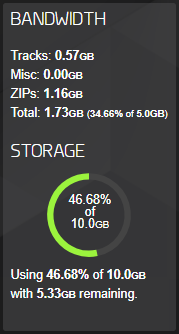
If you notice you are nearing the limit and you don't want to go over, head to your campaigns page and deactivate any running campaigns to stop more people accessing & downloading them.
If you need help figuring out which plan is best suited to your needs please contact us and we will be happy to help.
Will sending a campaign in a lossless format ever cost more or incur higher bandwidth usage than sending in MP3?
No. We want to encourage everyone to send out their promos in lossless (WAV etc), so that recipients have the option of downloading in whichever format they like. As such, we have capped the bandwidth usage of a download at that of a 320kbps MP3. So even if a recipient downloads a lossless file from your campaign, you will only incur the amount of bandwidth usage as if they had selected 320 MP3.
This means that sending out a campaign with lossless downloads enabled will never cost you more than sending out a campaign with download quality limited to 320kbps MP3.
Am I charged twice if someone downloads twice?
Bandwidth will only be used once for each promo you send to a recipient regardless of how many times they download and stream the tracks within that billing period. For example, if a recipient downloads a track in your campaign five times, it will only use the bandwidth for a single download.
This does not apply to public links.
Changing your billing details or payment method
You can change your billing name & address by going to the 'Account' tab of your settings page.
You can change your payment method (e.g. if you have a new credit card) whenever you're paying an invoice. Autopayment is taken 7 days after an invoice is generated, so just visit the invoices page any time in the 7 days after an invoice is generated and then click on 'PAY WITH A DIFFERENT METHOD' to add the new details (which will then be saved and also used for future invoices).
You can see when your next invoice will be generated either on the right hand side of your dashboard or on the invoices page itself.
As an example: if your billing day is the 14th of each month, you can head to the invoices page any time between the 14th and the 20th, and you'll see the option to pay the outstanding invoice with a different method. On the 21st, the invoice will be paid automatically using whichever card/Paypal you already had saved and you'll have to wait for the following month to update your details.
Accepted payment methods
We accept direct electronic payment over our website. You can use any of the following:
Debit cards:
- Electron
- Maestro
- Mastercard debit
- Visa debit
Credit cards:
- Mastercard
- Visa
- American Express
Other:
- Paypal
Subscription Terms
All accounts are on a one month rolling contract and if you want to avoid being invoiced you can switch your account to the Essential Plan.
Contact us for our full terms and conditions.
Pausing or cancelling your subscription
If you don't need to use your account for any period you can move your account onto the free-tier Essential plan. This prevents you from being invoiced when the account isn't being used.
Changing to the Essential plan can be done by the primary user in the account settings. This change will come into effect on your next billing day so your account and promos will remain live until the switch. You will then receive your final invoice for this last period when the change goes through.
Changing back to a paid plan is done in the same way except this change will come into effect immediately and your billing day will become the day you change back.
Note: on the Essential Plan you can only have one active campaign, so when you change onto Essential all campaigns will be de-activated except your most recent one. If you would like a campaign other than your most recent one to remain online and accessible to your recipients, you can either manaully de-activate all except the one you'd like to remain online before you change to Essential, or you can simply re-activate it after the change and this will de-activate the one that was left online by default.
For more information about what you can do on the Essential Plan, see here
Essential Plan (free) features
The main limitations of the Essential Plan are that you can only have one active campaign at a time, and you can only send to 30 people per month. Additionally, you can't use public links and you are limited to 1GB of bandwidth usage per month.
This makes it ideal for limited mailouts, or for pausing your subscription in the months where you have no new releases to promote.
What's my billing day?
FATdrop will invoice you on the same date of each month from the day you open your account (or first switch onto a paid plan). For example, if you opened your account on the 10th, your billing day would be the 10th of every month.
You can check your billing day at any time on the right hand side of your dashboard, where it says "Next invoice:".
If you switch onto the Essential Plan for any period of time, your new billing day would be the day of the month that you switch back to one of the paid plans.
Changing to a different subscription plan
The different pricing options and information can be found by logging in and visiting the account tab of your settings page.
Changes can only be made by the account's primary user. Simply choose which price plan best suits your needs, hit select, and your account will be upgraded from the start of your next billing day.
If you need help choosing the right plan, please feel free to contact us
Invoices
Invoices will be sent to the primary user, plus the billing user (if one is set) and any custom users. with access to invoices.
You can also download any of your invoices by going to your invoices page. By default it will only show the invoices which are currently due, but you can choose the 'All Invoices' tab at the top to see previous ones too.
How do I have my invoices sent to a different email address?
To do this, the primary user on the account needs to go to the 'Users' tab of the settings page and create a new billing user, using whichever email you would like the invoices to go to. As well as receiving invoices by email, your billing user can also set a password and login to pay any outstanding bills.
I have not used my account, why have I been sent an invoice?
FATdrop is a subscription based service with a rolling contract. It is important to remember that even if you don't send any campaigns in a given month, your promos will still be online and accessible to your recipients and might still be attracting downloads. If you don't wish to use your account for a period you need to switch your account to the Essential Plan to avoid being invoiced your normal subscription fee.