Email Troubleshooting
Ensuring promos do not go to spam/junk
The spam filter on the various email clients usually "learn" from what you do, so if you mark promos you don't want as spam, you may miss promos that you really want. If someone is sending you FATdrop promos that you aren't interested in, instead of marking them as spam in your email client, instead head to your subscriptions page and unsubscribe from any mailing lists you don't want to be on.
If promos are landing in your spam/junk folder, you should be able to mark them as 'not spam' to stop it happening in future. Additionally, you should add delivery@fatdrop.co.uk to your contacts/safe senders/whitelist in the email client. How to do that will vary depending on which email client you use but below are instructions for Gmail:
- First, check to see if you have any promos in your spam folder by doing a Gmail search for in:spam from:fatdrop.co.uk

- If you find any promos in this search, open them and mark them as not spam.

- Go to Google Contacts and click the button in the top left to add a new contact, then create a contact for delivery@fatdrop.co.uk
That's it! You're all set up to never miss a promo.
Making promos appear in the primary tab in Gmail
Gmail's tabbed inbox feature automatically sorts incoming mail using several different filters. FATdrop messages will be sorted into either "Updates" or "Promotions" (depending on which tabs you have activated) although you may wish for promos to appear in your "Primary" tab
The Primary tab by default is for person to person conversation, however it is possible to update this so promos from FATdrop will appear there.
Firstly find a promo from FATdrop, right click on it, then select "Move to tab" / "Primary".
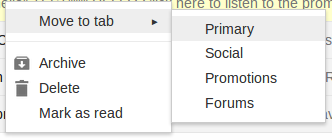
After doing so you will be given the option "do this for future messages from delivery@fatdrop.co.uk"

Click "Yes" and now in future promos from FATdrop will appear in your "Primary" tab.
Issues with receiving promo emails
If you aren't receiving FATdrop promo emails, first check your junk/spam folder and if you find any FATdrop promos in there make sure to mark them as "not spam". You should then add the delivery address "delivery@fatdrop.co.uk" to your address book or safe list to avoid this problem reoccurring.
If there is nothing in your spam filter, it's possible the email is being blocked by your network. If this isn't the case, please contact us and we will check the status of the email.
Deleted/lost promo emails
If you have deleted the FATdrop promo email you were sent you can still find the promo in your recipient dashboard. Just follow the steps on screen to login and you will be able to view all of the promos you have access to.
If the campaign in question has been deactivated or you no longer have access to it, you will need to email the sender directly. If you still have one of their promo emails, just hit reply on it and it will automatically address the email to whoever sent you the promo.